
How to Attach a Custom Domain to AWS Services (Step-by-Step Beginner Guide)

Attaching a custom domain (like codearchitecture.in) to AWS services is one of the most important steps when deploying real-world applications.
By default, AWS gives you long, ugly URLs like:
But in production, you want something clean, professional, and brand-friendly:
In this complete guide, you’ll learn:
What a custom domain really means in AWS
How DNS, SSL, and AWS services work together
How to attach custom domains to S3, CloudFront, API Gateway, Amplify, and ALB
Common mistakes (and how to avoid them)
This tutorial is beginner-safe, even if you’re touching AWS for the first time.
What Is a Custom Domain in AWS?
A custom domain is simply your own domain name (purchased from a domain registrar) mapped to an AWS service.
Instead of users accessing your app via an AWS-generated URL, DNS routes traffic from your domain to the AWS resource.
Example:
| AWS Service | Default URL | Custom Domain |
|---|---|---|
| CloudFront | <code>dxxxxx.cloudfront.net</code> | <code>www.example.com</code> |
| API Gateway | <code>abc.execute-api.amazonaws.com</code> | <code>api.example.com</code> |
| Amplify | <code>main.d123.amplifyapp.com</code> | <code>example.com</code> |
AWS Services That Support Custom Domains
You can attach custom domains to almost all major AWS services:
Amazon S3
Amazon CloudFront
Amazon API Gateway
AWS Amplify
Elastic Load Balancer
Amazon Route 53
High-Level Architecture (How Everything Connects)
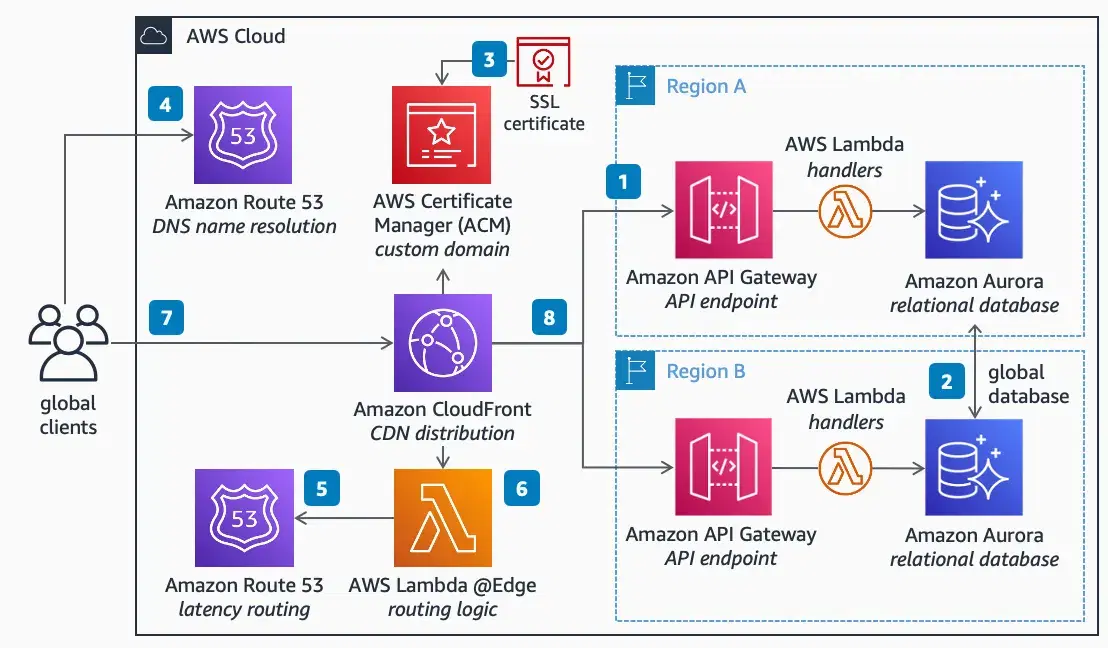
Flow looks like this:
Step 1: Buy a Domain Name
You can buy a domain from:
Amazon Route 53
GoDaddy
Namecheap
Hostinger
info
💡 Tip: If you’re already using AWS heavily, Route 53 makes life easier. Otherwise, any registrar works fine.
Step 2: Understand DNS Records (Very Important)
Before touching AWS, understand these records:
| Record | Purpose |
|---|---|
| A / AAAA | Points domain to IP (rare in AWS) |
| CNAME | Points domain to another domain |
| ALIAS / ANAME | AWS-friendly version of A record |
| TXT | Used for SSL & domain verification |
Example:
Step 3: Create an SSL Certificate (Mandatory)
AWS requires HTTPS for custom domains.
Use AWS Certificate Manager (ACM)
Steps:
Go to AWS Certificate Manager
Click Request a certificate
Enter:
Choose DNS validation
Add the provided CNAME record in your DNS provider
⚠️ Region Rule (Very Important):
| Service | Certificate Region |
|---|---|
| CloudFront | us-east-1 ONLY |
| API Gateway (Regional) | Same region as API |
| ALB | Same region as Load Balancer |
| Amplify | Managed automatically |
Step 4: Attach Custom Domain to CloudFront (S3 / Next.js / Static Sites)
Steps:
Open CloudFront
Select your distribution
Go to Settings → Edit
Add:
Select SSL certificate from ACM
Save & deploy
DNS Record:
Step 5: Attach Custom Domain to API Gateway
Steps:
Open API Gateway
Go to Custom domain names
Create new domain:
Select ACM certificate
Choose endpoint type:
Map API & stage
DNS Record:
Step 6: Attach Custom Domain to AWS Amplify (React / Next.js)
Amplify is the easiest.
Steps:
Open AWS Amplify
Select your app
Go to Domain management
Add domain
Amplify will show DNS records
Add them to your DNS provider
✅ Amplify automatically:
Creates SSL certificate
Handles renewals
Manages redirects
Step 7: Attach Custom Domain to Application Load Balancer (ALB)
Steps:
Create HTTPS Listener (443)
Attach ACM certificate
Point listener to target group
DNS Record:
Common Mistakes (Avoid These!)
Certificate in wrong region
Forgetting DNS validation
Using CNAME on root domain instead of ALIAS
Expecting instant propagation (DNS takes time)
Mixing CloudFront + API Gateway certificates
How Long Does It Take to Work?
| Step | Time |
|---|---|
| SSL Validation | 2–10 minutes |
| CloudFront Deploy | 10–30 minutes |
| DNS Propagation | Up to 24 hours |
SEO & Production Best Practices
Always redirect HTTP → HTTPS
Use www → non-www (one canonical)
Use CloudFront for caching
Enable gzip / brotli
Set proper cache headers
Final Thoughts
Attaching a custom domain in AWS may look scary at first, but once you understand:
DNS
SSL
Service-specific rules
…it becomes a repeatable 10-minute process.
This setup is mandatory for production-grade applications and a huge plus in interviews and freelancing projects.